
Posting periods: User-specific time intervals
Allow posting to past periods only to certain users
FINANCIAL KNOWLEDGE
5/8/20243 min read
Introduction
During the accounting close process, it's common for the finance department to continue making adjustments to the closing period, while other users should already be posting transactions in the new period.
If only one period remains open, the users responsible for the close won't be able to post the final adjustments. However,, if both periods remain open without any control, any user could post transactions in the previous period, compromising the integrity of the close.
To address this issue, SAP allows two periods to remain open simultaneously using transaction OB52, restricting access to one of them through specific authorizations. In this article, we'll see how to configure this functionality and what aspects to review to avoid errors.
How do opening periods work in SAP?
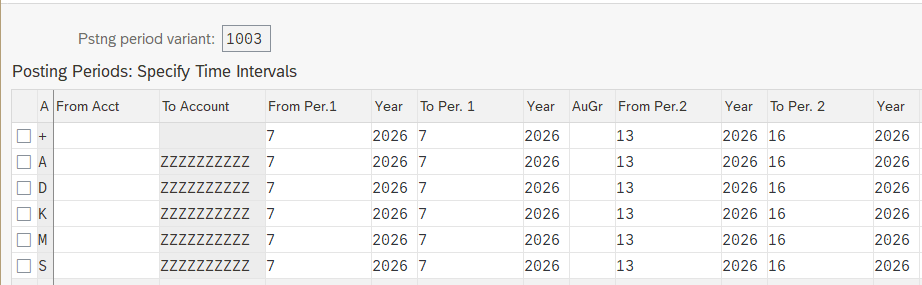
The opening and closing of accounting periods in SAP FI are managed using transaction OB52. This transaction doesn't directly configure company codes, but rather a period variant. This variant is assigned to one or more FI company codes. This means that any changes made in OB52 to a variant will automatically affect all company codes that use that variant. Transaction OB52:

Configuring two open periods
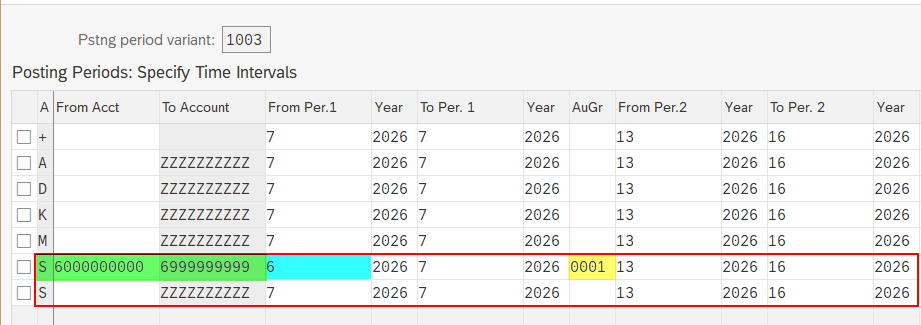
SAP allows you to define two open period intervals. The first can be used for the period that is still being closed, and the second for the current period, in which other users will continue to record transactions as normal. This functionality is especially useful during monthly closings, as it avoids having to continually open and close periods when making final accounting adjustments. In the example shown below, note in green that the first interval has also been defined for a specific range of accounts.

What is the function of the Authorization Group field?
This field (shown in yellow in the previous image) allows you to specify which users can post transactions in the restricted period. By entering a value, only users with the authorization object F_BKPF_BUP with that same value 0001 will be able to post documents in that period. If the field is left blank, both periods will be open to all users. This function allows you to separate closing tasks from the rest of the finance department's daily work.
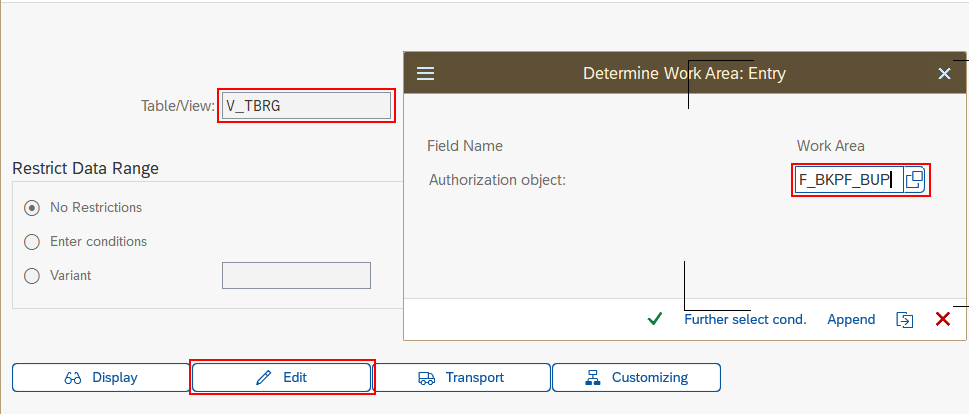
Note that you must first create authorization group 0001 using transaction code SM30 as follows in order to use it in OB52 later:



Configuring users and authorizations
Once the authorization group is configured in SM30 and OB52, the corresponding role must be modified using transaction PFCG. Contact your users and authorizations administrator in SAP to take the following actions. The authorization object F_BKPF_BUP must be included in the role, assigning it the same value defined in SM30.


Next, assign the role to the users you want to grant access to post to the previous period. It's important to verify that regular accounting users don't have an asterisk (*) on the F_BKPF_BUP object within any of their roles, as this would also allow posting to the previous period, overriding all the configuration explained above.
Locking Periods in Controlling
In addition to the control available in Finance (FI), SAP also allows you to manage period locking in Controlling (CO) using tcode OKP1. With this tcode, you can lock specific periods for certain activities within a CO company code, preventing modifications once the closing processes are complete. Although both controls are independent, it is recommended to review their configuration when the company makes intensive use of Controlling processes.
The following example shows that it is possible to select a row and click "Lock Transaction", or select a column and click "Lock period", to lock all transactions in that period.


© 2024. All rights reserved. Functitech